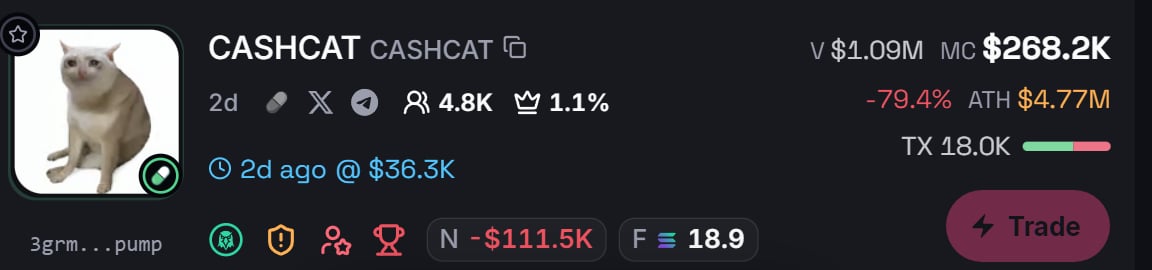
Every signal card carries the full case for the token. This page walks it top to bottom.
A signal card: volume, market cap, ATH, transactions, first alert, and the chip row

The header numbers

Most numbers expand on hover. TX, for example, opens the exact buy and sell split:
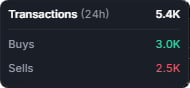
The TX panel showing the transaction count and buy and sell totals

First alert

The blue first-alert line shows when the signal first formed and its recorded entry market cap. Use that entry value as a reference beside the current market data. The time and entry value do not necessarily describe the same instant.

The chip row

The chips show a mixture of statuses and numeric values. Hover a chip (tap on mobile) to open its full panel. The captures below are live hovers, straight from the feed.

Safety

The shield opens the available safety information, including authority and liquidity status. Read each displayed item and any reason line. The Safety score is a risk score: lower values indicate less reported risk. A green indicator or low risk score does not guarantee that a token is safe.
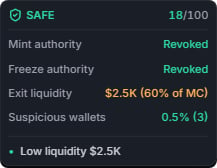
The Safety panel with authority status, liquidity, suspicious wallets and a reason line
Review the reason line alongside the displayed value rather than treating the number as a verdict on its own.

Holders

The holder panel displays the available holder categories and percentages. Read its labels and footnotes in the panel; a category label is context, not a safety guarantee.
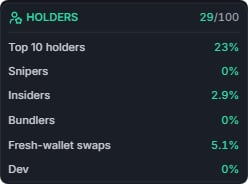
The Holders panel showing categories and their displayed percentages

Top traders

The Top Traders panel displays the available holding and activity summary for this token. It is a view of historical and current information, not a list to copy or a prediction.
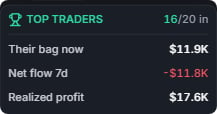
The Top Traders panel with count, holdings, net flow and realized values
Read the displayed count, holdings, net flow and realized values together. Check their labels and periods before comparing them.

Dex paid

The displayed DEX profile payment and boost status. Payment for a profile or boost is not an endorsement of the token.

F: all-time fees

The token’s displayed cumulative transaction fees, in SOL. This is a market-data field, not the price of Premium or a fee charged by a Primal Trade link.

N: net buy flow

The displayed Net buy flow (24h), in USD. Positive and negative values show the direction of that metric; neither predicts the next price move. With active Premium and a platform selected in Premium setup, Trade opens this token’s chart on that provider in a new tab. None keeps it inactive. Amounts, wallet approval and execution happen with the provider; Primal does not submit a swap.
No single chip is a verdict. Read the card’s information together, check the contract address, and make your own assessment of the token and its risks.