

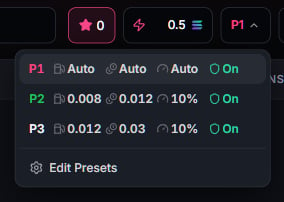
Recommended defaults
New to slippage, priority fees, and tips? Leave P1 as it ships and trade. It is built to be the answer for most people:
P2 and P3 ship with fixed manual values rather than Auto: tighter slippage, larger fees. Use them
when you want a trade to behave the same way every time regardless of conditions.
One habit worth having: raise slippage only when a trade keeps reverting on a thin market, and
remember it is the worst price you are agreeing to accept, not a target. Signed transactions are
submitted through Primal’s managed relay; preset settings never select a browser RPC endpoint.
The settings panel
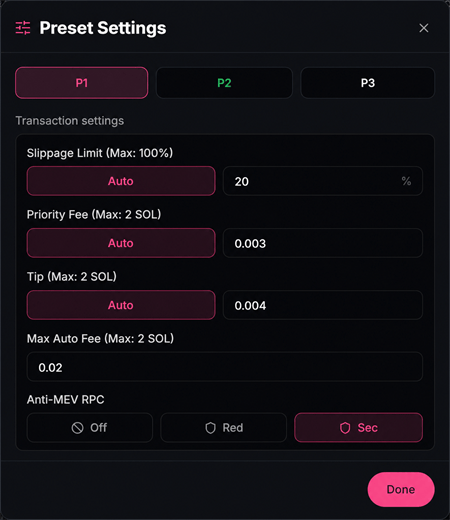
Auto mode
Set fee, tip, or slippage to Auto and the terminal resolves them at trade time from live network conditions. Priority fees target fast inclusion at the current market rate. Tips track what protected execution currently costs. Slippage adapts to the pool. The Max auto fee ceiling always wins: Auto never spends past it.MEV protection
A sandwich attack sees your buy in the public mempool, buys before you land, and sells into your fill. The Anti-MEV setting controls whether your transaction is ever visible there. Three modes:
Two guarantees behind Red and Sec:
- No public fallback. Ever. If the protected lane cannot land your transaction, it fails. The terminal never silently retries through the public mempool, because a retry there is exactly the exposure you paid to avoid. A failed transaction costs at most its network fee; a sandwich costs far more.
- Honest confirmation. Bundles can land late. Sec trades are watched for a longer confirmation window, so a fill that lands at the edge is reported as the trade it is, not falsely declared dead.