> ## Documentation Index
> Fetch the complete documentation index at: https://docs.primal.trade/llms.txt
> Use this file to discover all available pages before exploring further.
# Presets
> Tune execution once, apply it everywhere. Or let Auto handle it.
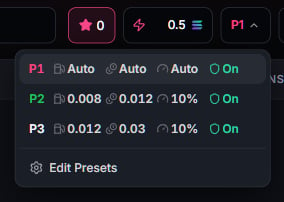
A preset bundles your execution settings. Each trading surface shows its active preset next to
the buy controls. Tap it to switch between P1, P2, and P3, or open **Edit Presets** to change
what they mean.
 | Setting | What it does |
| ------------ | ------------------------------------------------------------ |
| Slippage | Max price movement you accept before the transaction reverts |
| Priority fee | What you pay validators for faster inclusion |
| Tip | Direct tip for bundled or protected execution |
| MEV mode | How aggressively your transaction avoids sandwich attacks |
| Max auto fee | Hard SOL ceiling on what Auto may spend on fee plus tip |
| Custom RPC | Optional. Submit through your own endpoint |
## The settings panel
| Setting | What it does |
| ------------ | ------------------------------------------------------------ |
| Slippage | Max price movement you accept before the transaction reverts |
| Priority fee | What you pay validators for faster inclusion |
| Tip | Direct tip for bundled or protected execution |
| MEV mode | How aggressively your transaction avoids sandwich attacks |
| Max auto fee | Hard SOL ceiling on what Auto may spend on fee plus tip |
| Custom RPC | Optional. Submit through your own endpoint |
## The settings panel
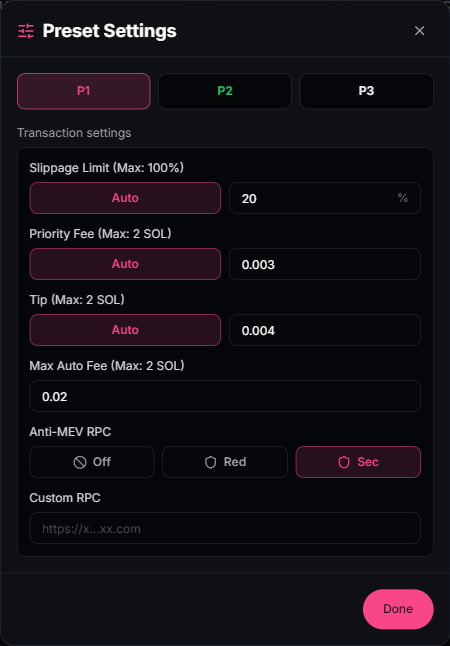 Each preset holds its own copy of every setting. The pink **Auto** pills and the Anti-MEV row are
the two controls that matter most; the rest is manual override for when you want exact numbers.
## Auto mode
Set fee, tip, or slippage to **Auto** and the terminal resolves them at trade time from live
network conditions. Priority fees target fast inclusion at the current market rate. Tips track
what protected execution currently costs. Slippage adapts to the pool. The **Max auto fee**
ceiling always wins: Auto never spends past it.
## MEV protection
A sandwich attack sees your buy in the public mempool, buys before you land, and sells into your
fill. The Anti-MEV setting controls whether your transaction is ever visible there. Three modes:
| Mode | How it submits | What that means |
| ------- | ---------------------------------- | -------------------------------------------------------------------------------------------------------------- |
| **Off** | Standard RPC | Fastest propagation. Visible in the public mempool, so it can be sandwiched |
| **Red** | Protected lane, single transaction | Routed directly to block builders. Skips the public mempool |
| **Sec** | Protected lane, atomic bundle | The strongest mode and the default on every shipped preset. Your transaction lands as an all-or-nothing bundle |
Two guarantees behind Red and Sec:
* **No public fallback. Ever.** If the protected lane cannot land your transaction, it fails.
The terminal never silently retries through the public mempool, because a retry there is
exactly the exposure you paid to avoid. A failed transaction costs nothing; a sandwich does.
* **Honest confirmation.** Bundles can land late. Sec trades are watched for a longer
confirmation window, so a fill that lands at the edge is reported as the trade it is, not
falsely declared dead.
The tip setting funds the protected lane. On Auto it tracks what protected inclusion currently
costs; the **Max auto fee** ceiling still applies.
Each preset holds its own copy of every setting. The pink **Auto** pills and the Anti-MEV row are
the two controls that matter most; the rest is manual override for when you want exact numbers.
## Auto mode
Set fee, tip, or slippage to **Auto** and the terminal resolves them at trade time from live
network conditions. Priority fees target fast inclusion at the current market rate. Tips track
what protected execution currently costs. Slippage adapts to the pool. The **Max auto fee**
ceiling always wins: Auto never spends past it.
## MEV protection
A sandwich attack sees your buy in the public mempool, buys before you land, and sells into your
fill. The Anti-MEV setting controls whether your transaction is ever visible there. Three modes:
| Mode | How it submits | What that means |
| ------- | ---------------------------------- | -------------------------------------------------------------------------------------------------------------- |
| **Off** | Standard RPC | Fastest propagation. Visible in the public mempool, so it can be sandwiched |
| **Red** | Protected lane, single transaction | Routed directly to block builders. Skips the public mempool |
| **Sec** | Protected lane, atomic bundle | The strongest mode and the default on every shipped preset. Your transaction lands as an all-or-nothing bundle |
Two guarantees behind Red and Sec:
* **No public fallback. Ever.** If the protected lane cannot land your transaction, it fails.
The terminal never silently retries through the public mempool, because a retry there is
exactly the exposure you paid to avoid. A failed transaction costs nothing; a sandwich does.
* **Honest confirmation.** Bundles can land late. Sec trades are watched for a longer
confirmation window, so a fill that lands at the edge is reported as the trade it is, not
falsely declared dead.
The tip setting funds the protected lane. On Auto it tracks what protected inclusion currently
costs; the **Max auto fee** ceiling still applies.