> ## Documentation Index
> Fetch the complete documentation index at: https://docs.primal.trade/llms.txt
> Use this file to discover all available pages before exploring further.
# Customization
> Make the terminal yours: table density, colours, columns, token info lanes, and quick-buy sizing per surface.
Every table surface carries a **Display Settings** panel behind the sliders icon in its toolbar.
The settings persist per surface, so your Radar can run compact while Alpha stays comfortable.
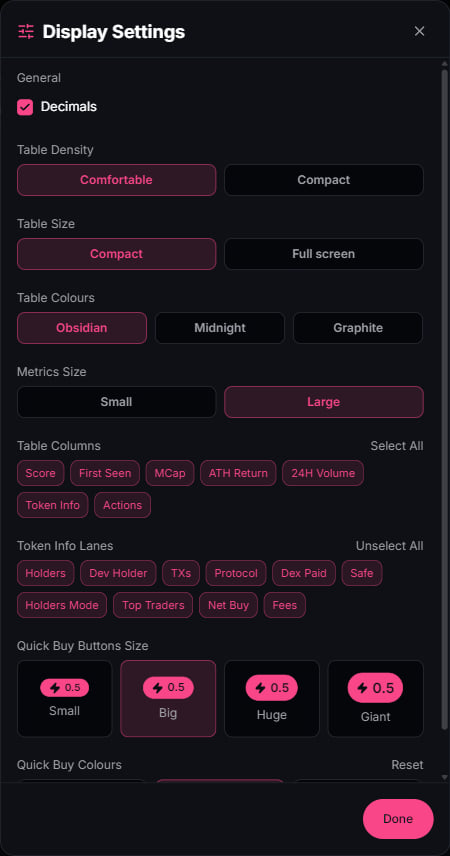 ## What you control
| Group | Options |
| ---------------- | ------------------------------------------------------------------------------ |
| Table density | Comfortable or compact rows |
| Table size | Contained width or full screen |
| Table colours | Obsidian, Midnight, Graphite |
| Metrics size | Small or large numerals |
| Table columns | Score, First seen, MCap, ATH return, 24h volume, Token info, Actions |
| Token info lanes | Holders, dev holder, TXs, protocol, Dex paid, Safe, top traders, net buy, fees |
| Quick buy | Button size from small to giant, plus button colours |
| Decimals | Full precision or rounded values |
## Per-surface amounts
The quick-buy amount is set where you trade: each Radar lane, the Alpha page, and each dock panel
remembers its own. Size Discovery punts small and Conviction entries big, and neither touches
the other.
## Presets
Execution settings live one level up in [Presets](/trading/presets): slippage, priority fees,
tips, and Anti-MEV mode, selectable per surface right next to the buy controls.
## What you control
| Group | Options |
| ---------------- | ------------------------------------------------------------------------------ |
| Table density | Comfortable or compact rows |
| Table size | Contained width or full screen |
| Table colours | Obsidian, Midnight, Graphite |
| Metrics size | Small or large numerals |
| Table columns | Score, First seen, MCap, ATH return, 24h volume, Token info, Actions |
| Token info lanes | Holders, dev holder, TXs, protocol, Dex paid, Safe, top traders, net buy, fees |
| Quick buy | Button size from small to giant, plus button colours |
| Decimals | Full precision or rounded values |
## Per-surface amounts
The quick-buy amount is set where you trade: each Radar lane, the Alpha page, and each dock panel
remembers its own. Size Discovery punts small and Conviction entries big, and neither touches
the other.
## Presets
Execution settings live one level up in [Presets](/trading/presets): slippage, priority fees,
tips, and Anti-MEV mode, selectable per surface right next to the buy controls.